The NAB 2026 Update vs. The Wish List
Blackmagic, We Need to Talk (The Conspiracy)
Blackmagic, we need to talk. I'm not saying you've bugged my office, but if I find a tiny URSA Micro hidden in my houseplant, we are going to have a very awkward conversation. Back in October 2025, I sat down and wrote a blog post called 'The Ultimate Wish List: My Dream ATEM Upgrades That Would Break the Broadcast World (and Budgets)'. At the time, I described trying to keep up with your pace of innovation as 'running a marathon in flip-flops'—painful, slightly embarrassing, and you're pretty sure your toes shouldn't be that colour.
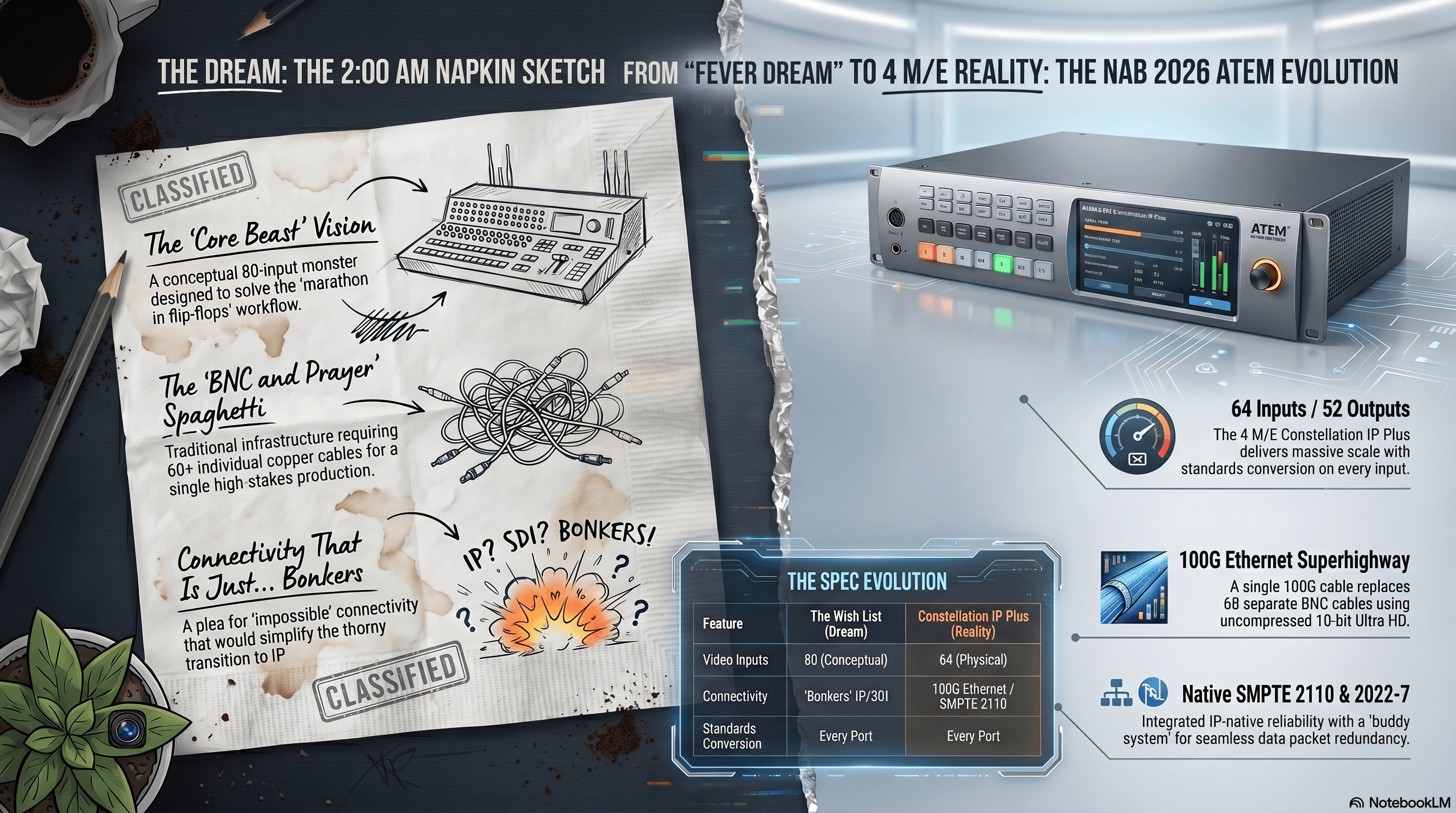
I laid out a 'Core Beast' of a switcher, a conceptual blueprint for a machine that would finally make sense of the chaotic, hybrid nature of modern broadcasting. It was a fever dream, the kind of thing you scribble on a napkin at 2:00 AM while trying to figure out why your SDI cable is lying to you. But then NAB 2026 happened, and I watched the update video with a growing sense of dread—or was it destiny?
The similarities between my 'Dream ATEM' and the new ATEM 4 M/E Constellation IP are, frankly, uncanny. I asked for 'connectivity that is just... bonkers,' and you delivered 100G Ethernet that replaces 60 separate BNC cables. I'm starting to think Grant Petty isn't just a CEO; he's a mind-reader with a very specific interest in my late-night schematics.
But let's pivot from my paranoia to the reality: Grant mentioned in the video that these designs weren't just a happy accident—they were driven by direct industry feedback. That is the real headline here. It means the 'little guy' with a blog and a dream is finally on the same page as the 'big industry players' running global broadcasts.
Whether you're a Technical Director who dreams in pixels, a Showrunner trying to keep the budget from exploding, or a complete newbie who thinks 'IP' stands for 'It's Possible,' this update is for you. We're moving into a world where the gear is smarter, the cables are fewer, and the 'mind-reading' is actually just a company listening to its users. So, grab a coffee (or a tea, if you're feeling civilized), and let's dive into the gear that just made my wish list look like yesterday's news.
The Conspiracy Theory is dead; long live the feedback loop!
Wait, What's a 2110? (A Beginner's Guide to the Future)
If you've ever walked behind a broadcast rack and felt like you were looking at a giant plate of technological spaghetti, you are not alone. For decades, the industry has relied on SDI (Serial Digital Interface). It's reliable, it's sturdy, and it's the reason I have lower back pain from crawling under desks to find 'Cable #54' which, let's be honest, is usually the one that's unplugged.
In my October 2025 'Dream ATEM' wish list, I described the transition to IP video as 'thorny,' where every cable looks the same but carries a completely different protocol. It's like going to a family reunion where everyone is named 'Dave,' but one Dave only speaks French, another only talks about Bitcoin, and a third just wants to show you his stamp collection.
The Problem: The Cabling Nightmare
Traditionally, if you wanted to connect a massive switcher like the ATEM Constellation 8K, you needed a forest of BNC cables. Every single video signal—every camera, every preview, every graphics feed—needed its own dedicated copper wire. If you had 60 inputs and outputs, you had 60 cables.
You're trying to run a high-stakes, multi-million dollar production, but you're tripped up by the sheer physical weight and complexity of your own infrastructure. If one BNC connector gets a little loose, your signal starts flickering like a haunted house, and you're stuck playing a high-stakes game of 'Operation' in a dark rack room.
The Solution: SMPTE 2110 (One Cable to Rule Them All)
Enter SMPTE 2110. If you're a newbie, don't let the numbers scare you. Think of it as sending video like an email, but instead of a cat meme, you're sending uncompressed, 10-bit Ultra HD video at lightning speed.
The new ATEM 4 M/E Constellation IP isn't just a switcher with some Ethernet ports slapped on the back; it is a native 2110 machine. This is the 'one cable to rule them all' moment I've been dreaming of. Instead of that bird's nest of 60 BNC cables, the new ATEM uses just four 100G Ethernet cables to handle the same 32 inputs and 28 outputs.
100G: The Video Superhighway
Why 100G? Well, imagine a standard home internet cable is a one-lane dirt road. 10G Ethernet (which many of us use for storage) is a decent two-lane highway. 100G Ethernet is a 16-lane superhighway with no speed limit and a police escort.
Because Ethernet is bi-directional, each one of those 100G ports on the ATEM can handle eight video inputs and eight video outputs simultaneously. It's like having a revolving door that's twenty feet wide; people (or pixels) can go in and out at the same time without bumping into each other. This bandwidth is what allows the ATEM to support 32 native inputs, each with its own standards converter, without the back of the unit looking like a copper mine.
Redundancy: The 'Just in Case' Safety Net
Now, I know what the old-school Technical Directors are thinking: 'Jim, if I run everything over one cable and that cable breaks, I'm toast.'
First of all, 'Jim's Toast' is a great name for a breakfast café, but you're right to be worried. That's why Blackmagic implemented SMPTE 2022-7 redundancy. On the back of the new gear, you'll see ports in groups of two. This is the 'buddy system' for your pixels.
When the system is running, it takes every pixel, turns it into a little data packet, and duplicates it. One copy goes down 'Cable A' and the other goes down 'Cable B'. At the other end, the switcher looks at both and says, 'I'll take whichever one gets here first'. If a cable gets unplugged or a network switch decides to take a nap, the other link is already there with the backup data. There are no glitches, no frames dropped, just seamless video.
The Practical Reality for Newcomers
For the showrunners and budget-watchers out there, this move to 2110 and 100G isn't just about being 'fancy.' It's about efficiency. You can now install a Blackmagic SDI Expander 8x12G in a studio and run a single optical fiber back to your rack room. That one fiber replaces 16 heavy, expensive BNC cables.
It means your setup times are faster, your gear is lighter, and your 'spaghetti' levels are at an all-time low. We are finally moving away from the era of 'BNC and Prayer' into the era of IP-native reliability.
So, to my fellow technical directors: put down the LX tape and the label maker. The future is here, it's 100G, and it's surprisingly quiet—unlike my last server rack, which sounded like a jet engine taking off in a library.
The 'Ultimate Machine' Comparison: Wish vs. Reality
Alright, let's get into the 'Beast' itself. In my October 2025 'fever dream,' I asked for a switcher with 'Connectivity That is Just… Bonkers'. I specifically requested 80 inputs and standards conversion on every single port because, let's be honest, trying to match mixed frame rates manually is the technical equivalent of trying to fold a fitted sheet—frustrating and ultimately impossible.
The Switcher: The Numbers Game
Blackmagic clearly heard the 'bonkers' part. While my wish list was a conceptual 80-input monster, the new ATEM 4 M/E Constellation IP Plus is a very real, very heavy 3RU machine that boasts 64 inputs and 52 outputs. If you don't quite need to run a small country's national broadcast, the standard IP model gives you 32 inputs and 28 outputs.
The best part? Every single one of those inputs has a standards converter. It's like having a translator for every 'Dave' at the family reunion we talked about earlier. No matter what weird signal your cameraman throws at you, the ATEM just handles it.
The 'Shhh!' Factor: Thermal Design
One thing I specifically begged for was reliability. In the world of high-end IP gear, that usually means fans that sound like a Boeing 747 taking off in your ear. But Grant pointed out that these switchers are designed for broadcast trucks, where people actually have to, you know, hear themselves think.
The new IP switchers feature a front-to-back cooling system with four separate fans that run slowly and quietly. They only 'scream' for a second when they boot up—kind of like me when I see my kids' browser history—but then they settle into a professional whisper. It's a brilliant bit of engineering that keeps the 'brain' of your show cool without making the crew go deaf.
Fairlight Live: The Software Pivot
Now, I have to admit, I got one thing 'wrong' (or at least, Blackmagic did it better). My wish list called for a massive, all-in-one physical Fairlight console. I wanted motorised faders and a desk I could lean on while looking important.
Instead, Blackmagic launched Fairlight Live, which is a software-based mixer. At first, I was skeptical—isn't 'software mixing' just a fancy way of saying 'my computer is going to crash mid-show'? But the reality is brilliant. Fairlight Live can handle hundreds or even thousands of channels depending on the power of your computer.
Grant even showed it running on a MacBook Neo—a $600 laptop—handling over 300 channels of audio. This is a 'pro-move' for cost-effectiveness. You can run your entire audio suite on a Mac Mini tucked away in a rack, providing a level of power and redundancy that used to cost six figures for the price of a decent lawnmower.
Camera Control: A Step Toward the Suite
Finally, let's talk about Camera Control. My wish list asked for an 'integrated advanced colour system' that would staple a DaVinci Resolve suite right onto the hardware.
While we didn't get a brand-new CCU panel this year, we got something arguably cooler: the URSA Cine 12K 100G workflow. This camera has the DaVinci Resolve primary colour corrector built directly into the camera. You are literally grading from 16 stops of dynamic range in real-time. It's the 'step in the right direction' we needed—moving the 'surgery' of colour correction closer to the source.
In short: Blackmagic didn't just build my dream machine; they built one that's quieter, smarter, and runs on a laptop. I'm not saying they're mind-readers, but I've started wearing a tin-foil hat just in case.
The Dante Dilemma and The Creative Workaround
Now, we have to talk about the elephant in the room—or rather, the missing Italian poet in the room. In my original 'Dream ATEM' wish list, my audio-obsessed heart was practically singing for native Dante support. I wanted a system that would finally 'get cozy' with Dante and MADI, unifying the digital audio maze onto a single surface. I even asked for dedicated Dante networking ports to simplify routing.
The Issue: Where's Dante?
When the NAB 2026 update dropped, I scanned the back of the new ATEM Constellation IP and the Fairlight Live specs looking for that familiar Dante logo. Instead, Blackmagic went all-in on SMPTE 2110-30 for audio. If you're somewhat new to this, it's like expecting a specialized charging port for your phone and finding out the whole world just moved to a different kind of USB.
The Reason
Why did they do it? It usually comes down to the 'L' word: Licensing. Native Dante hardware requires specific chips and licensing fees paid to Audinate. Blackmagic's whole approach is about using open standards to keep costs down for us. By sticking to SMPTE 2110, they stay within the open broadcast standard without passing on those extra licensing costs to your wallet. It's the 'I see why they did it' moment, even if it means we have to be a bit more creative with our setups.
The Problem-Solving Workaround
But don't panic! Just because there isn't a 'Dante' port on the back doesn't mean you have to throw your expensive Dante mics in the bin. This is where creative routing comes in.
Because Fairlight Live is a software-based mixer, it doesn't just live in a black box; it lives on a computer—whether that's a laptop, a Mac Mini, or a beefy workstation. It is designed to work with standard computer audio drivers: Core Audio on Mac and ASIO on Windows.
This is the bridge we've been looking for. You can run Dante Virtual Soundcard (DVS) on the same computer that's running your Fairlight Live mixer. DVS makes your computer think the Dante network is just another standard audio interface. You can then route those Dante channels directly into the Fairlight Live software, giving you all that 'Dante goodness' without the native hardware port.
A New Tool in the Kit: The Fairlight Live 2110 IP Audio Adapter
While we're talking about workarounds, Blackmagic did announce a specific 'bridge' for this IP world: the Fairlight Live 2110 IP Audio Adapter. This is a small, rack-mountable converter coming later this year designed to help bridge the gap between traditional audio setups and the new 2110 world.
It's the logical step for those of us who aren't ready to go 100% IP-native yet. It means we can keep our existing gear and slowly dip our toes into the 2110 ocean without drowning in cable adapters.
The Verdict for Technical Directors
To my fellow TDs and showrunners: the lack of native Dante isn't a deal-breaker; it's just a change in strategy. We're moving from hardware-locked systems to software-flexible ones. Is it as simple as a dedicated port? No. But is it more powerful because we can run it on a $600 laptop and scale up to thousands of channels? Absolutely.
It might look a little unconventional, but if it gets the signal through cleanly and reliably, it's a win.
Expanding the IP Universe: Breakout Boxes, Power, and the 'Silent Partner' in the Rack
If the new ATEM Constellation IP is the brain of your production, then the ecosystem of converters and switches Blackmagic launched at NAB 2026 are the nervous system—and trust me, after years of untangling BNC cables, my nerves could use the break. In my original wish list, I talked about the 'thorny transition to IP video'. I was worried that we'd all be stuck in a middle-ground purgatory, with one foot in the old world of SDI and the other tripping over Ethernet cables.
Blackmagic's response wasn't just to build a switcher and wish us luck; they built a bridge. Several of them, actually. Let's look at the gear that turns that 'thorny transition' into a stroll in the park.
The Blackmagic SDI Expander 8x12G: The Problem-Solver Box
First up is the Blackmagic SDI Expander 8x12G. In the old days, if you wanted to connect eight cameras and eight monitors in a studio back to your control room, you were running 16 separate BNC cables through the walls. That's 16 opportunities for a cable to snag, a connector to break, or for you to accidentally label 'Camera 1' as 'Camera 7' and spend three hours questioning your life choices.
The SDI Expander is essentially a breakout box for the 2110 world. You plug in a single 100G optical fiber cable, and on the back, you get eight independent 12G SDI inputs and eight independent 12G SDI outputs. Because 100G is a massive 'superhighway,' it can handle all 16 of those uncompressed 10-bit Ultra HD signals simultaneously.
Pro Tip: Think of this like a high-tech power strip for your video. Instead of running eight extension cords to the kitchen, you run one big 'mother' cable and plug everything in right where you need it. At $2,995, it's a massive saving on cabling and sanity. Plus, it has that same front-to-back quiet cooling and a front-panel LCD for monitoring—so you can actually see what's happening without having to sniff the vents for 'magic smoke'.
The Blackmagic Studio Bridge 10G PWR: Power to the People (and Cameras)
One of my biggest anxieties in production is power. There is nothing worse than having a perfectly good Ethernet connection for your camera but still needing to find a wall outlet for the power brick. It's like having a wireless phone that still needs to be plugged into the wall to work—it defeats the purpose.
Enter the Blackmagic Studio Bridge 10G PWR. This 2RU beast is designed to bridge eight separate 10G Ethernet connections into one single 100G link for the switcher. But the 'PWR' in the name is the star of the show. It provides 90W of PoE (Power over Ethernet) power to every single one of those eight ports.
This means you can run eight Blackmagic Studio Camera Pro 6K units directly from this one box. One copper Ethernet cable to the camera handles the video, the return feed, the tally, the control, and the power. No power bricks. No 'cable-slips.' Just one click, and you're live. Priced at $2,495, it's a powerhouse for any studio manager who wants a clean floor.
The Blackmagic Ethernet Switch 820: The Silent Partner
We have to talk about the 'Brain's Brain'—the Blackmagic Ethernet Switch 820. Now, I know what you're thinking: 'It's a switch, Jim. It's a box with holes in it. How exciting can it be?'
In my wish list, I begged for a system that simplified digital audio and video routing. Standard data center switches are great if you like complex command-line interfaces and fans that sound like a vacuum cleaner is permanently attached to your head. The Switch 820 is different. It's a native 100G Ethernet switch with eight ports, designed specifically for SMPTE 2110 IP video.
It features PTP (Precision Time Protocol) clock distribution. Think of PTP as the 'Master Conductor' of an orchestra. Every piece of gear in an IP network needs to be perfectly in sync, or your video will look like a badly dubbed 70s kung-fu movie. This switch distributes that clock to all eight 100G ports, keeping everything perfectly aligned.
And for my fellow Technical Directors: it supports NMOS routing. This means the switch talks to the rest of the gear automatically. You don't have to be a network engineer with three degrees to make 'Camera A' show up on 'Monitor B.' At $2,295, it's the quiet, professional partner that keeps the whole show from falling out of sync.
The Updown Cross 100G: The Universal Translator
Finally, let's talk about the Blackmagic Updown Cross 100G. In my 'Core Beast' wish list, I mentioned that my brain 'starts to fog over' when trying to match mixed frame rates. The Updown Cross is the cure for that fog.
It packs eight channels of up, down, and cross conversion into a single rack unit. It uses the same 100G Ethernet connection to handle eight signals in and eight signals out simultaneously. If you have an incoming feed from a drone that's 1080p and you need it to be 4K for your broadcast, this box just does it—automatically. At roughly $300 per channel ($2,435 total), it is a steal for anyone who deals with the 'chaos' of modern video standards.
The Verdict: Blackmagic didn't just give us a faster car; they paved the road, installed the streetlights, and even provided a comprehensive toolkit for when things get weird. We're moving from the era of 'BNC and Prayer' into the era of 'Fiber and Chill.'
Recording at Speed: The Cloud Store Ultra vs. The Media Dock Ultra
In my original 'ISO Obsessed' dream, I practically begged for 'Recording Power for the ISO Obsessed,' specifically asking for built-in recorders to eliminate stacks of external gear. Blackmagic clearly heard me, but instead of just stuffing a few SD cards into the switcher, they went full 'super-sized' with a storage ecosystem that makes my home NAS look like a digital abacus.
When you're dealing with the massive data rates of 100G IP video—specifically recording eight channels of Ultra HD ProRes—you need storage that doesn't just 'work,' but storage that can handle a literal firehose of data without breaking a sweat. This brings us to the ultimate storage showdown: the Blackmagic Cloud Store Ultra vs. the Blackmagic Media Dock Ultra.
The Heavyweight: Blackmagic Cloud Store Ultra
The Cloud Store Ultra is the 'brain' for your long-term storage needs. In the update, Grant described this as a 'whole new design' that is dramatically faster than previous models.
The Dual-Lane Superhighway: The standout feature here is the two separate 100G Ethernet ports. This is a brilliant move for efficiency: you can have your HyperDeck ISO Recorder 100G recording to one port while your editors are busy on the second port. Because they are on separate networks, the editors won't interfere with the recording bandwidth. It's like having two separate doors to the fridge—one for everyone to grab drinks and one to hide the 'good' leftovers.
Capacity and Cost: This unit comes in two massive sizes: 24 TB ($8,835) and 48 TB ($15,695). Grant mentioned that flash memory prices have been 'psychotic' lately, which explains the price tag, but for a system that syncs directly to Blackmagic Cloud, it's the center of a professional post-production workflow.
Monitoring: It includes SDI and HDMI monitoring outputs so you can see your storage status on a big screen, plus redundant power supplies because having a backup is the only way to sleep at night on a major production.
The Sprinter: Blackmagic Media Dock Ultra
If the Cloud Store is the house, the Media Dock Ultra is the getaway car. It looks similar but serves a very different purpose. This is for the production where you need to 'walk away with the media' immediately after the director yells 'Cut!'.
Physical Media Modules: Unlike the Cloud Store Ultra, which has internal storage you have to copy files out of, the Media Dock Ultra uses the same super-fast media modules found in the URSA Cine 12K. It features media slots with a glowing LED ring: it's red when writing and green when reading—perfectly for when you're working in a dark truck and can't find your glasses.
The 'Walk Away' Factor: At the end of a job, you can literally pull the media module out and hand it to the editor. No waiting for file copies. No hanging around the truck at 2:00 AM while a progress bar mocks you.
Connectivity: Just like its bigger brother, the Media Dock Ultra features two 100G Ethernet ports, SDI/HDMI monitoring, and redundant power. It's priced at $2,995 (body only), making it a much more affordable entry point if you already own the media modules for your cameras.
The Comparison: Which One Wins?
So, how do they stack up?
| Feature | Primary Use | Speed | Storage Type | Monitoring | Price |
|---|---|---|---|---|---|
| Cloud Store Ultra | High-speed central network storage | Dual 100G Ethernet Ports | Internal (24TB or 48TB) | SDI and HDMI Status Outs | $8,835 - $15,695 |
| Media Dock Ultra | Instant physical media hand-off | Dual 100G Ethernet Ports | Removable Media Modules (URSA Cine style) | SDI and HDMI Status Outs | $2,995 |
The Verdict: If you are building a permanent studio where your editing team is connected via fiber and you need massive, reliable capacity, the Cloud Store Ultra is your beast. But if you're a traveling production or a broadcast truck where the client needs to leave with their footage the second the show ends, the Media Dock Ultra is the practical tool you need.
Either way, Blackmagic has finally solved the bottleneck of recording eight channels of high-res video. My ISO-obsessed heart can finally stop palpitating.
Next up, we're looking at the 'Cinema Quality' coming to live production—it's time to talk about the URSA Cine 12K and the 100G IP Camera workflow!
Cinema Quality Live: The URSA Cine 12K and the 100G Revolution
Now, if you've been following my 'fever dream' wish list from 2025, you know I was obsessed with one thing: shading. In the broadcast world, 'shading' isn't about finding a nice spot under a tree; it's the process of making sure all your cameras actually look the same. There is nothing that ruins a show faster than cutting from a beautiful, vibrant shot of the host to a second camera that looks like it was filmed through a bowl of cold porridge.
In my wish list, I asked for an upgraded camera control panel that 'stapled a professional color suite right onto the hardware'. I wanted the ability to do secondary color correction—HSL qualification, luma, and saturation control—live, without having to send the feed through three different external boxes. Well, Blackmagic didn't just staple a color suite to a panel; they stuffed DaVinci Resolve directly into the camera.
The URSA Cine 12K: A Software Transformation
The big news for the existing URSA Cine 12K is a massive software update that turns this digital film titan into a native ST 2110 live production camera.
By simply selecting 'ST 2110 Live' from the menu, the camera's 10G Ethernet port starts pumping out broadcast-ready IP video. This is an ingenious move: you take a camera with 16 stops of dynamic range and a massive 12K sensor and drop it into a live environment. It even has a dedicated 3D LUT for the 2110 output, so you can give your live broadcast a 'film look' while keeping the ISO recording perfectly clean for the post-production team. (No more heart attacks for the colorists later!).
Rigging the Beast: The Accessories
Of course, you can't just point a cinema camera at a football pitch and hope for the best. You need the right rigging gear. Blackmagic launched a suite of accessories to make this work:
- B4 Broadcast Lens Mount ($495): This lets you use those super-fast, high-end broadcast lenses with the servos we all know and love.
- URSA Cine Studio Viewfinder ($1,495): This is a 7-inch, high-brightness screen that basically becomes an extension of the camera's brain. You can access all the camera menus via touch directly on the viewfinder, which is way easier than squinting at a tiny side-monitor while the action is happening.
- Lens Control Cable ($95): A simple cable that lets the camera talk to the lens, because communication is key in any relationship—especially between a 12K sensor and a B4 lens.
The New Heavyweight: URSA Cine 12K 100G
If the standard 12K is a luxury sedan, the new URSA Cine 12K 100G is a monster truck with a PhD. This model features a native 100G Ethernet port on the back.
Why do you need 100G on a camera? Two words: Bandwidth and Replay. This camera is a high-frame-rate beast. Because 100G is such a massive 'superhighway,' this camera can output up to 440 frames per second in Ultra HD.
We saw a demo of this at an ice hockey game, and the detail was frankly ridiculous. At 200 or 400 frames per second, you aren't just seeing the puck; you're seeing the individual ice shavings flying off the player's skates in slow motion. This isn't a 'special' high-frame-rate camera that only does one thing; it's one of your main production cameras that can also do the super-slow-mo heavy lifting whenever you need it.
Live Grading: The Resolve Advantage
The real 'mic drop' moment here is that you are grading from the full 16 stops of dynamic range in real-time. Because the DaVinci Resolve primary color corrector is built into the camera, the Technical Director can tweak the look with surgical precision from the control room.
It's 'Live Cine' in the truest sense. You get the quality of a Hollywood feature film with the speed and reliability of a live broadcast. It makes the old way of shading cameras look like we were trying to paint a masterpiece with a crayon.
Pro Tip: If you're a showrunner, the price for the URSA Cine 12K 100G starts at $8,995 (body only). That sounds like a lot until you realize it replaces a dedicated high-speed camera that would normally cost five times that much. It essentially pays for itself on the first few jobs where you don't have to rent specialty high-frame-rate gear.
Eye Candy for the Server Room: The ATEM Monitoring Rack Panels
Now, if you're like me, you've spent a lot of time staring at broadcast racks. And let's be honest: while we love the power of these new 1RU and 2RU units, the shift to 'front-to-back cooling' has left the front of our racks looking a little… well, barren. Grant even admitted in the NAB update that while the ventilated designs are professionally necessary to keep the 100G beasts cool, we lost that 'cool factor' of having a bunch of glowing buttons and screens to play with.
If I'm going to convince my showrunners (or my wife) that I need a budget for a new rack, I need it to look like the deck of the Starship Enterprise, not a very expensive radiator.
The 'Secret Identity' of the Monitoring Panels
Blackmagic's solution is a stroke of genius. They've released the ATEM Monitoring Rack Panel 20 and the ATEM Monitoring Rack Panel 40. At first glance, you'd swear they were the front panels of the 2M/E and 4M/E Constellation switchers. But here's the twist: they aren't switchers. They are native 2110 IP video converters with a built-in control panel.
Because they don't have the massive processing 'brains' of a full switcher, they don't generate much heat. This means they don't need those screaming data-center fans, allowing them to have a solid front face filled with glorious, tactile buttons.
Specs That Actually Matter
Don't let the 'Eye Candy' nickname fool you; these things are workhorses.
- Connectivity: On the back, you get 12G SDI and HDMI outputs, which is perfect for connecting to a high-end monitor or a cheap TV in the production office.
- Redundancy: Just like the high-end gear, they feature dual 10G Ethernet ports for SMPTE 2022-7 redundancy.
- Talkback: There's a dedicated talkback connector right on the front, embedded into channels 15 and 16 of the video signal.
Why You Actually Need One (Besides the 'Cool' Factor)
The real pro-move here is that these panels are bidirectional. You can connect the control Ethernet port to your main ATEM switcher, and suddenly those buttons aren't just for show—they actually control the main switcher.
Imagine you're setting up a gig. Your main control desk is still in a flight case, and the cable guys are still arguing about where the coffee machine goes. With a Monitoring Rack Panel installed, you can perform engineering tests, route signals, and check your program feed directly from the rack. It turns your server room from a 'closet of mystery' into a functional secondary control point.
The Price of 'Spicing Up' the Rack:
- Panel 20: ($995) – Based on the 2M/E Constellation 4K front panel.
- Panel 40: ($1,595) – Based on the 4M/E Constellation 4K, featuring a massive LCD and 40 program/preview buttons.
It's an affordable way to make your rack look exciting while adding a vital layer of monitoring and control. As a TD, it's the peace of mind of knowing you can see your program video right there on the unit without hunting for a multiviewer. Plus, it makes the whole system feel 'unified'—and as we all know, a unified rack is a happy rack.
The Future is Immersive: URSA Cine Immersive and the Live Encoder
If you thought 12K was overkill, pull up a chair and hold onto your hat. Blackmagic has been quietly working on the 'Holy Grail' of modern entertainment: Live Immersive Production.
We're talking about content for headsets like the Apple Vision Pro. In my October 2025 wish list, I didn't even dare to dream about this because the data rates are, quite frankly, insane. But Grant didn't get the memo that 'insane' is a bad thing.
The Immersive Math (Warning: High Nerd Levels)
To make an experience feel real in a headset, you need 8K square resolution per eye running at 90 frames per second in stereo. This is nearly double the vertical resolution of standard 8K, and it's being pushed at a frame rate that would make a standard computer curl up into a ball and cry.
To handle this, Blackmagic launched the URSA Cine Immersive 100G. This camera is a digital film beast designed to be as close to reality as possible. But even with a 100G Ethernet port, the raw data is too much for a single cable to handle comfortably.
The 'Secret Sauce': The Live Encoder
This is where the Blackmagic URSA Cine Live Encoder comes in. It's a module that slides into the camera's media slot—replacing the storage module—and acts as a real-time ProRes encoder. It compresses that massive immersive feed down to about 46 Gb/s, which fits perfectly onto a 100G Ethernet link.
Pro Tip: This means you can actually run two immersive cameras through a single Blackmagic Studio Bridge 100G, giving you a redundant set of eyes for your live event.
The 'Solaris' Solution: The Switcher that Ate My Lunch
Of course, you can't just plug an immersive 3D camera into a standard ATEM and expect it to work. You need a 3D Switcher. Blackmagic unveiled the ATM Solaris i64, a 'monster' of a machine designed to handle 64 immersive live cameras.
The Solaris is actually two switchers in one—one for the left eye, one for the right eye. It's deeper, heavier, and features quad-redundant power supplies (because if this thing goes down, the entire Metaverse probably blinks out of existence).
At an expected price of $110,000, it's not exactly 'entry-level,' but it shows exactly where the industry is going. We are moving from 'watching' an event to 'being' at the event.
The Fairlight Live Revolution: Audio Gets a Software Upgrade
If you're a regular reader, you know my mantra: 'Bad audio is worse than bad video.' You can watch a slightly grainy video of a cat playing a piano, but if the audio sounds like a robot gargling gravel, you're turning it off in ten seconds. For years, the audio side of the ATEM ecosystem felt a bit like the neglected middle child—stuck with a basic internal mixer and a few faders on a screen. But for NAB 2026, Blackmagic didn't just give the middle child a new pair of shoes; they bought it a rocket ship and named it Fairlight Live.
The Software Mixer: Why Your Laptop is the New Console
In my 2025 wish list, I dreamed of a physical 'Fairlight Live Console' with motorized faders and a dedicated surface. Blackmagic delivered on the hardware (which we'll get to), but they started with something even more radical: making the mixer entirely software-based.
Unlike traditional hardware mixers that are limited by how many physical chips you can jam into a box, Fairlight Live's power is only limited by your computer. Grant demonstrated the 40-fader panel running off a MacBook Neo—a $600 laptop—that was handling over 300 channels of audio. For the math-challenged (me), that's a professional broadcast mixer for the price of a fancy espresso machine.
This software approach is a brilliant move for redundancy. In the 'Failsafe Mode,' you can have a secondary computer mirroring your primary mix. If your main computer decides to take a nap mid-show, the secondary one takes over instantly, and the crowd never hears a glitch. It's the ultimate 'safety net' that lets you sleep at night.
Features for the 'ISO Obsessed' and the Sound Designer
Fairlight Live is packed with features that make a technical director's heart race:
- The Cue Player: This is basically a professional soundboard right at your fingertips. It features 16 audio cues for jingles, stingers, or that 'sad trombone' sound when a player misses a goal. Plus, it has 16 MIDI cues that can trigger hardware—like turning on an 'On Air' light or firing a smoke machine when the host makes an entrance.
- Snapshots: These are 'save states' for your entire mixer. You can have a snapshot for the halftime show, one for the commentary, and one for the post-game interviews. You can transition between them with a single click, and the faders will slide into place automatically.
- Virtual Soundcheck (VSC): This is a lifesaver. You can record a rehearsal and then play it back through the mixer as if the talent were still there. It lets you fine-tune the EQ and dynamics without making the band stand on stage for four hours while you 'check the levels' for the hundredth time.
The Hardware: The Fairlight Live Audio Panels
Now, let's talk about the 'Ferrari' of the audio world: the Fairlight Live Audio Panels. While you can run Fairlight Live with a mouse and keyboard, trying to mix a live band that way is like trying to play a piano with a pair of oven mitts.
Blackmagic launched three models: the Panel 10 ($2,195), the Panel 20 ($3,495), and the massive Panel 40 ($7,495).
- Screen Real Estate for Days: Each group of 10 faders gets its own 11.5-inch touchscreen. These displays show you everything: channel strips, EQ curves, dynamics, and even 3D panning for spatial audio.
- The 'Silent' Touch: The faders are high-quality motorized units, and the buttons are designed to be almost silent with a positive 'click.'
- The Hidden Secret: On the back of these panels, Blackmagic built in a 2110 IP video converter. You can plug in a monitor via HDMI and see the program video directly on your audio desk. It even has a talkback system built in, eliminating the need for a separate station.
The Verdict: The 'Thank You' Update
The most shocking part? Fairlight Live is free. Blackmagic is giving it away as a 'thank you' to everyone who has bought an ATEM switcher. They've even updated the ATEM firmware so that models with USB-C (like the Mini and Constellation 4K) can now output multi-channel USB audio directly into the software.
The Verdict: Blackmagic didn't just meet my audio wish list; they blew it out of the water. We now have the power of a million-dollar broadcast suite running on a laptop with hardware that looks like it belongs in a sci-fi movie.
DaVinci Resolve 21 and the AI Revolution: The Brain in the Machine
If the ATEM switchers are the 'muscles' of your production and Fairlight is the 'voice,' then DaVinci Resolve 21 is the undisputed 'brain.' Now, I know what you're thinking: 'Jim, I'm still learning how to use the 'Blade' tool without cutting my own digital fingers off, why do I need an AI revolution?' Well, pull up a chair, because Blackmagic just gave us a toolkit that makes complex fixes look like child's play.
This year's update was initially going to be a 'quiet' one focused on bug fixes—the technical equivalent of cleaning out the garage—but a few 'extra things' made it in. By 'extra things,' Grant means a total AI overhaul that is going to save us all about a thousand hours of tedious clicking.
AI That Actually Finds Stuff: IntelliSearch and Slate ID
We've all been there: you're looking for that one shot of the host laughing, but you've got ten hours of footage and your filenames are all things like 'CLIP_001_FINAL_REALLY_FINAL_2.' It's a painful treasure hunt for your eyeballs.
Enter AI IntelliSearch. You can now ask Resolve to analyze your media pool for objects, locations, color schemes, or specific faces. It's like having a digital intern who never gets tired and actually remembers where the 'blue car' was in the background of scene four.
And for the organized (or aspiringly organized) among us, there's AI Slate ID. It automatically detects slates in a shot and reads the metadata—scene, take, angle—even if the slate is underlit or looking a bit worse for wear. It then populates the metadata fields for you. This is a huge win for efficiency; you can spend more time editing and less time squinting at a tiny wooden board.
The Beauty and the 'De-Ager': Saving Faces in Post
Now, let's talk about the new aesthetic features. Resolve 21 has more beauty and face effects than a high-end spa.
- AI Blemish Removal: This tool identifies skin imperfections—acne, pores, spots—and reduces them while keeping the natural skin texture intact. It's the ultimate 'look better on camera' button.
- AI Age Transformer: This is the one that really got me. You can detect a face, track it, and then use a slider to age or de-age the subject. Want to see what I looked like before I had to figure out IP video protocols? Just slide it to the left. It's perfect for continuity in stories that span years.
- AI Face Shaper: You can actually adjust the size and shape of eyes, noses, and mouths. It's great for comedy, horror, or just making sure everyone looks their absolute best after a 14-hour shoot.
Magic Focus and Motion: AI Cine Focus and Sharpness
Ever miss focus on a critical shot? (Don't answer that; we've all done it.) AI Cine Focus allows you to set the focus of a shot with a single click in post. It generates realistic lens blur and bokeh, letting you rack focus artificially like a Hollywood pro. You can even customize the bokeh shape and add chromatic aberration to make it look authentic.
To polish everything up, there's AI UltraSharpen for upscaling low-res media and AI Motion to Blur, which removes motion blur artifacts and softness. It's essentially 'CSI: Miami' style enhancement, but it actually works.
Hollywood Grading for Your Holiday Snaps: The Photo Page
The biggest surprise was the brand new Photo Page. Blackmagic realized that if they have the best color tools in the world for video, why not use them for photography? You can now import RAW images from Sony, Canon, Nikon, and Fujifilm and use Resolve's node-based color wheels, qualifiers, and curves to grade your photos.
It even supports tethered live capture from Sony and Canon cameras directly into the media pool. This means you can grade your everyday photography with the same high-end tools used on feature films.
Fusion, 'Crocod' Effects, and the Coffee Break
For the motion graphics wizards, the acquisition of Crocod effects means over 70 new professional tools are now built directly into Fusion. Plus, there's a new macro editor to make building your own templates even easier.
But the real MVP for your mental health is Background Rendering. You can now tell Resolve to render your proxies or transcode your media in the background while you keep working. You can even pause it automatically when you're actively editing to ensure your playback is smooth. It's the feature that finally gives you permission to go get that second cup of coffee.
The Price: The 'Thank You' Continues
The best part? DaVinci Resolve 21 is still free. The update for the Studio version is also free of charge. Grant thanked everyone who buys the Studio version because that's what pays for the engineering team to build these incredible tools.
The Verdict: Blackmagic didn't just give us a software update; they gave us a digital co-pilot. Whether you're fixing focus, de-aging your host, or just trying to find a clip of a 'red cat,' the 'brain' of the operation is smarter than ever.
The 'Still in the Dream Bin' Section
So, we've reached the end of the NAB 2026 whirlwind, and I have to say, the 'marathon in flip-flops' is officially over. We've gone from a world where I was sketching 'Core Beasts' on napkins to a reality where a 64-input IP switcher exists for a price that doesn't require selling a kidney on the dark web.
However, as anyone who has ever finished a 'quick' DIY project knows, there are always a few screws left over. While Blackmagic has moved mountains, there are still a few items from my October 2025 'Ultimate Wish List' that are currently sitting in the 'Dream Bin.'
What's Left?
The Hardware CCU Overhaul: In my wish list, I specifically begged for an upgraded Camera Control Panel that 'stapled a professional color suite right onto the hardware'. I wanted dedicated, tactile knobs for HSL qualification, Luma, and Saturation. While the new URSA Cine 100G workflow brings the DaVinci Resolve engine into the camera, we're still using the same physical control panels for shading. I'm still holding out hope for a panel that physically mirrors the Resolve color wheels—because there's nothing like the 'feeling' of a perfect grade under your fingertips.
Deep HyperDeck Integration on Panels: I asked for the ATEM Advanced Panels to become 'hyper-aware command centres' with dedicated physical control over every file and every start/stop command for those internal recorders. While the new Monitoring Rack Panels give us a great way to see what's happening in the rack, I still dream of a day where the transport controls for eight internal HyperDecks are baked directly into the main switching surface.
The Final Score
Even with those few lingering wish list items, the reality of this update is staggering. Blackmagic Design is clearly listening. Grant and his team have taken the 'knottiest problems' of live production—the cabling nightmares, the audio complexity, and the 2110 IP transition—and provided solutions that are smarter, quieter, and infinitely more affordable.
The price point is the real 'mic drop' moment. The ATEM 4 M/E Constellation IP at $7,995 beats even my 'break the budget' expectations. The industry is fundamentally better for this release. We now have cinema-quality images in live production, thousand-channel audio mixers that run on a laptop, and a 100G cabling solution that replaces sixty separate BNC cables.
The Conspiracy Theory is officially over. Blackmagic isn't reading my mind; they are reading the room. They've conquered the switcher, they've revolutionized the audio, and they've bridged the gap between cinema and live.
But there is one thing still missing from the Blackmagic ecosystem.
We have the cameras, the sound, and the switcher… but the stage is still dark. If they can make sense of SMPTE 2110 and thousand-channel Fairlight mixes, is it finally time for them to turn the lights on?